
In This Article
Accessing the Readiness Tracker Report
Overview
The Readiness Tracker Report allows users to classify ideas/initiatives based on readiness metrics by providing yes/no responses to a set of predefined attributes. This report helps organizations assess the preparedness and robustness of ideas/initiatives across multiple dimensions including ownership, value delivery, and overall robustness. The report provides a comprehensive view of idea/initiative readiness, making it easy to identify gaps and areas requiring attention before implementation.
The report is particularly useful for evaluating idea/initiative readiness before stage progression, identifying missing information or incomplete setup, ensuring ideas/initiatives meet quality standards, and supporting go/no-go decision-making.
Note: Users need the Readiness Tracker permission enabled in their role under Reports to be able to access and use this report. If you cannot view this report, please contact your system administrator to verify your permissions.
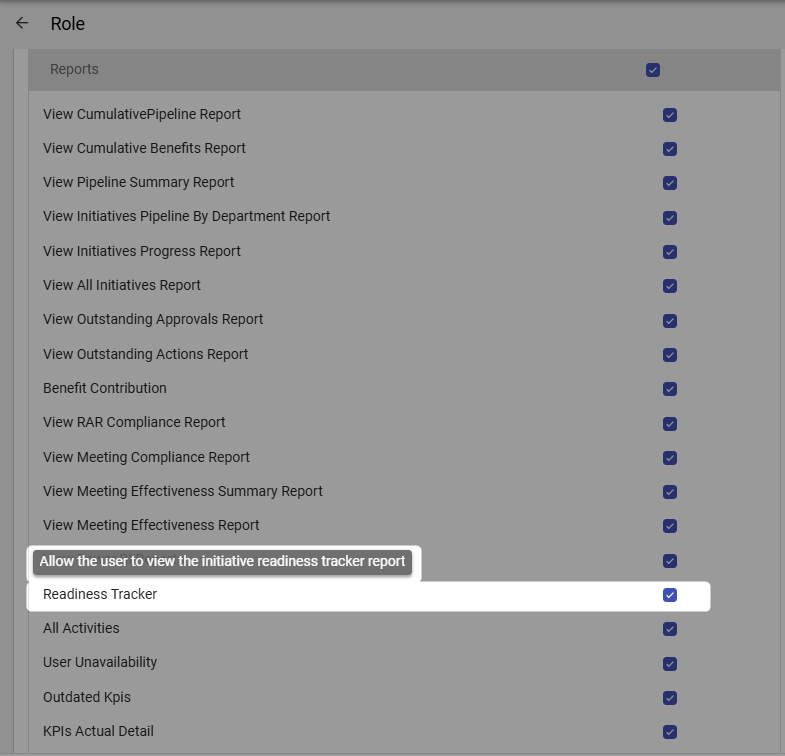
Accessing the Readiness Tracker Report
To access the Readiness Tracker Report:
- Navigate to the Reports module from the top navigation bar
- Select Readiness Tracker from the list of available reports
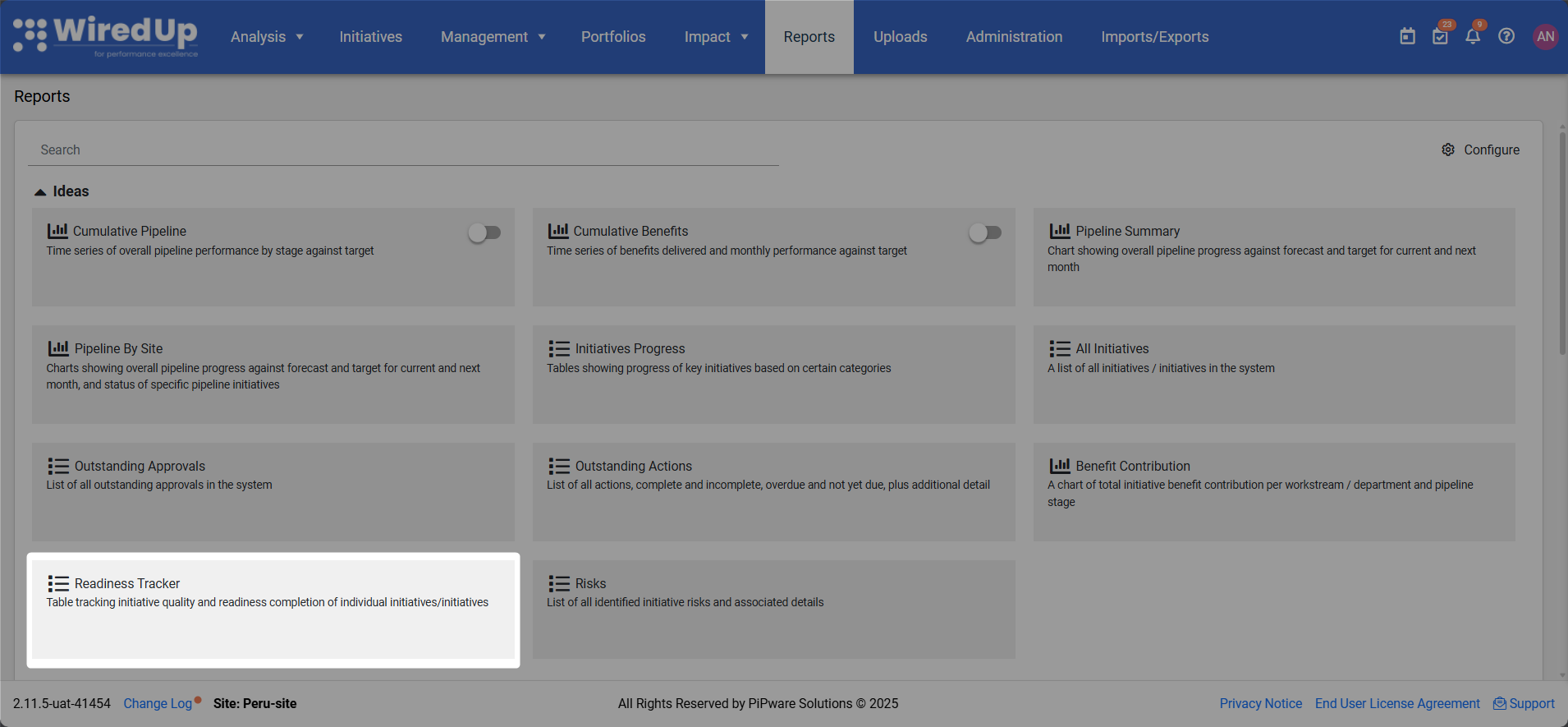
- The report will display with default filters applied (Status set to "Active"), showing all ideas/initiatives in a table format with readiness attributes
Understanding the Report
The Readiness Tracker Report consists of a comprehensive table displaying ideas/initiatives with their associated readiness metrics organized into multiple categories.
Table Structure
The report table is organized into the following main sections: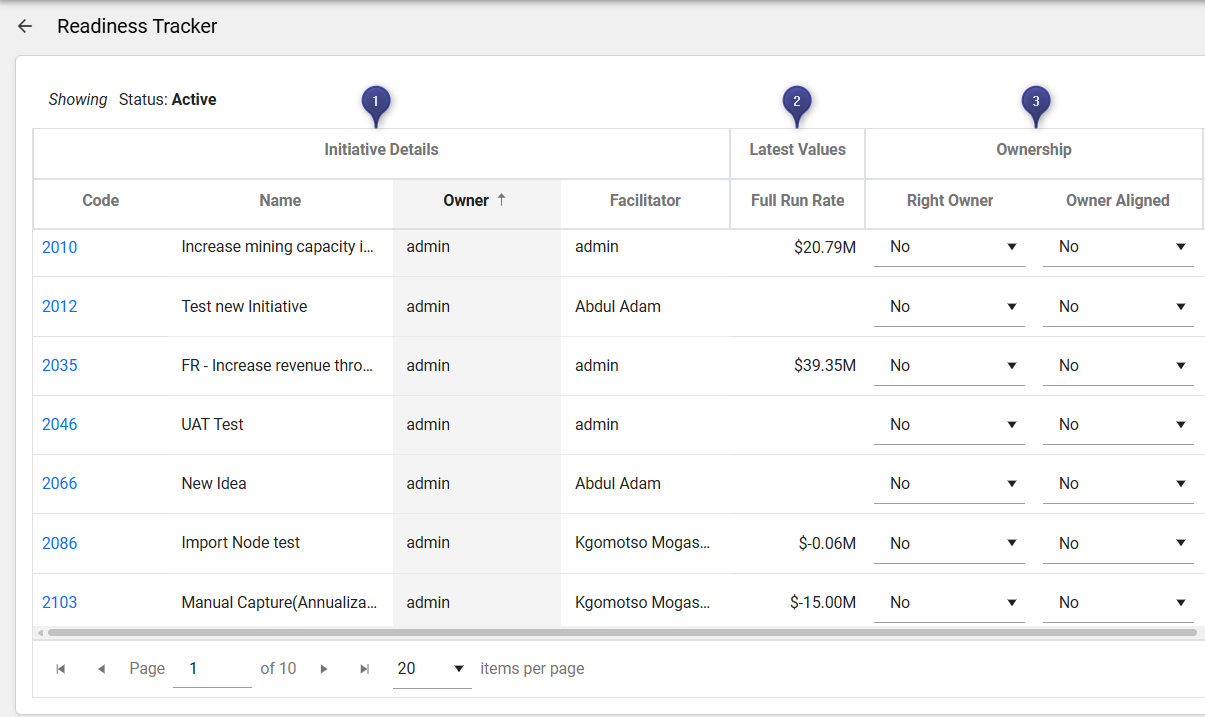
1. Initiative Details
- Code: Unique identifier for the idea/initiative. Click on the code to navigate directly to the idea/initiative details
- Name: The name or title of the idea/initiative
- Owner: The person responsible for the idea/initiative
- Facilitator: The person facilitating the idea/initiative
2. Latest Values
- Full Run Rate: The full run rate value for the idea/initiative
3. Ownership
- Right Owner: Indicates whether the correct owner is assigned (Yes/No dropdown)
- Owner Aligned: Indicates whether the owner is aligned with the idea/initiative (Yes/No dropdown)
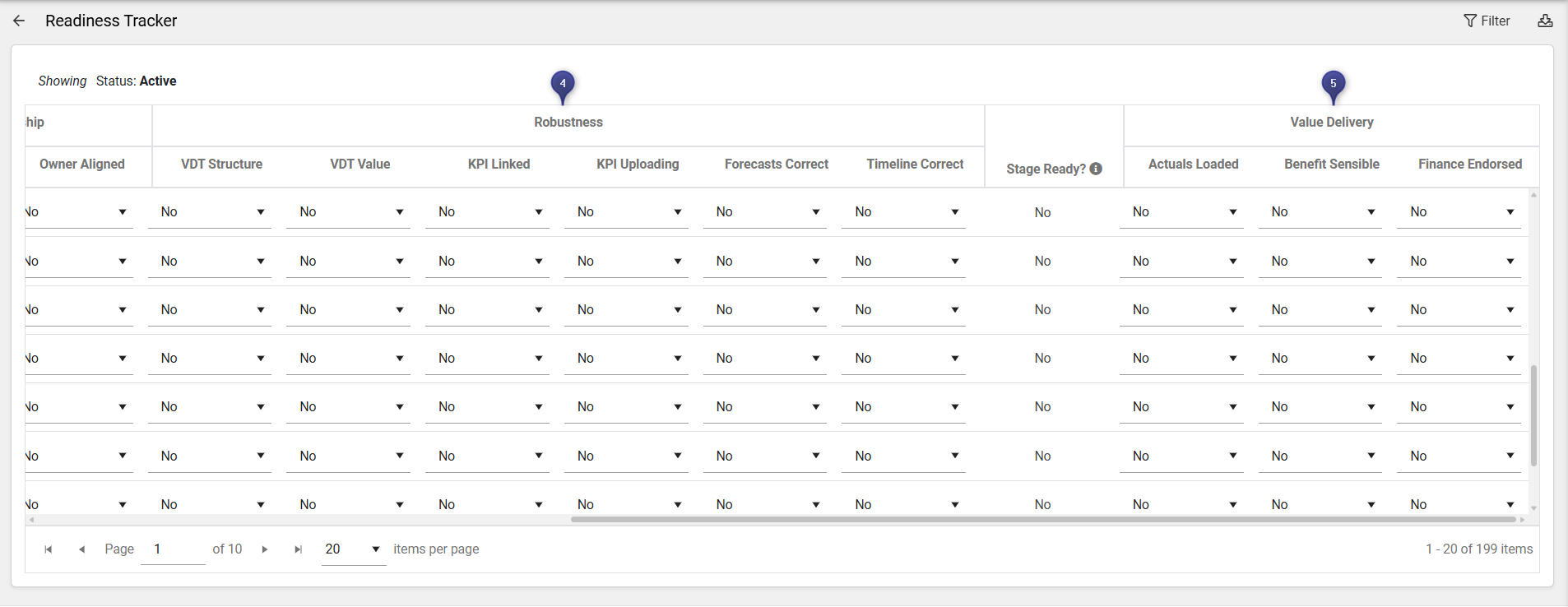
4. Robustness
- VDT Structure: Indicates whether the Value Driver Tree structure is properly configured (Yes/No dropdown)
- VDT Value: Indicates whether the VDT has appropriate values (Yes/No dropdown)
- KPI Linked: Indicates whether KPIs are linked to the idea/initiative (Yes/No dropdown)
- KPI Uploading: Indicates whether KPI values are being uploaded regularly (Yes/No dropdown)
- Forecasts Correct: Indicates whether forecasts are accurate and up-to-date (Yes/No dropdown)
- Timeline Correct: Indicates whether the timeline is properly configured (Yes/No dropdown)
5. Value Delivery
- Stage Ready?: Indicates whether the idea/initiative is ready to progress to the next stage (Yes/No)
- Actuals Loaded: Indicates whether actual values have been loaded (Yes/No dropdown)
- Benefit Sensible: Indicates whether the benefit calculations are reasonable (Yes/No dropdown)
- Finance Endorsed: Indicates whether finance has endorsed the idea/initiative (Yes/No dropdown)
Table Features
- Sorting: Click on column headers to sort the table by that column
- Dropdown Selection: Each readiness attribute has a dropdown menu where users can select "Yes" or "No"
- Pagination: Use the pagination controls at the bottom of the table to navigate through multiple pages of results
- Items per page: Adjust the number of items displayed per page using the dropdown menu (default is 20 items per page)
- Total count: The bottom right of the table displays the total number of ideas/initiatives
Report Filters
The Readiness Tracker Report includes several filters to customize the data displayed. These filters appear in the Filter panel on the right side of the screen when you click the Filter button.
Applying and Clearing Filters:
- Click the Filter button (top-right corner) to apply your selected filter criteria
- Click the Clear button to reset all filters to their default values
- The default filter when opening the report is Status set to "Active"
- Once filters have been applied, they will be displayed at the top of the report showing the selected filter criteria
Available Filters:
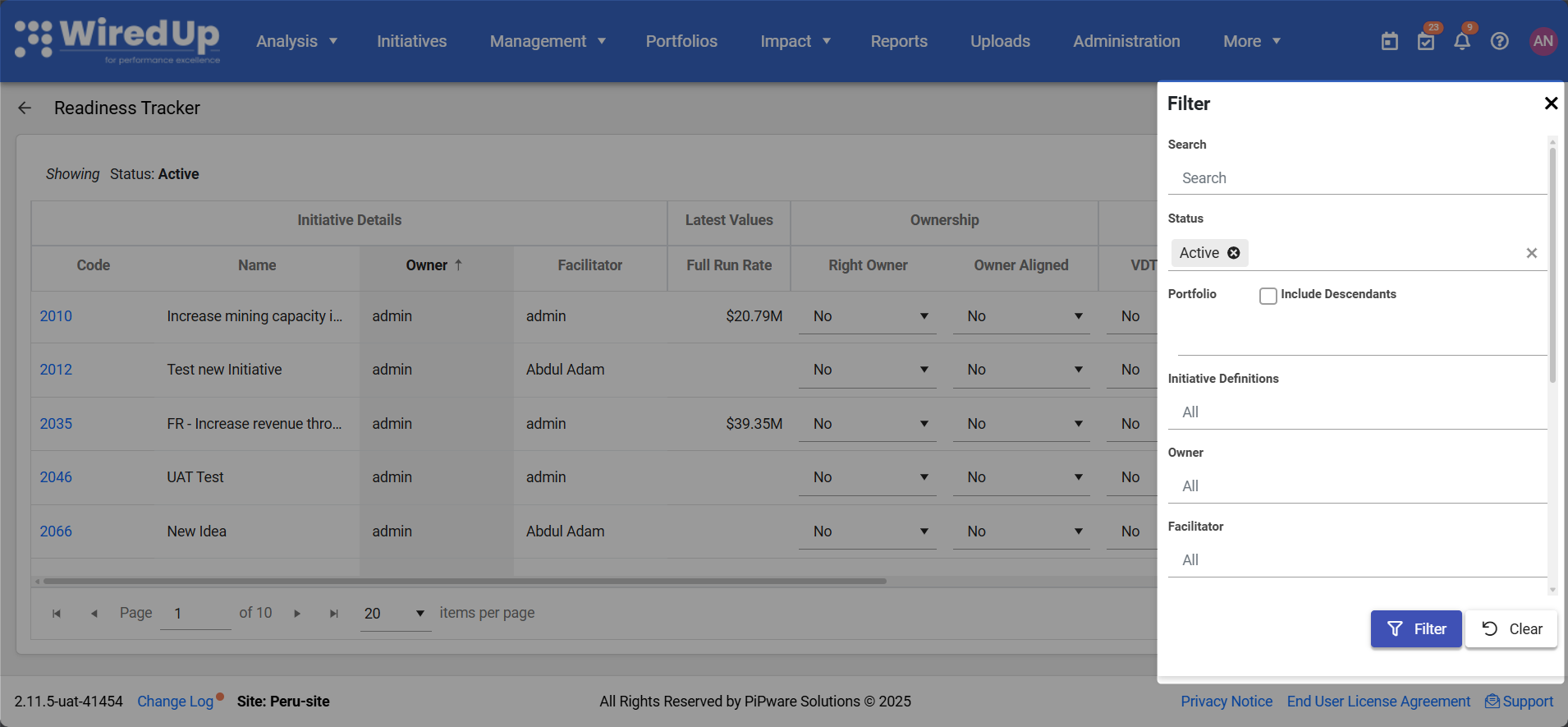
Search
- Enter text to search for specific ideas/initiatives by code or name
- Helps quickly locate particular ideas/initiatives in the list
Status
- Filter ideas/initiatives by their current status (e.g., Active, Approved, On Hold, Cancelled, Completed)
- Default setting shows "Active" ideas/initiatives
- Helps narrow down ideas/initiatives based on their operational status
Portfolio
- Select the specific portfolio, department, or site to view
- Include Descendants checkbox: When enabled, includes all sub-portfolios and departments under the selected portfolio
- Allows you to focus on ideas/initiatives from specific organizational areas
Initiative Definitions
- Filter by specific idea definition types configured in your system
- Default setting shows "All" initiative definitions
- Useful for focusing on particular categories of ideas/initiatives
Owner
- Filter ideas/initiatives by the assigned owner
- Default setting shows "All" owners
- Helps track ideas/initiatives assigned to specific individuals
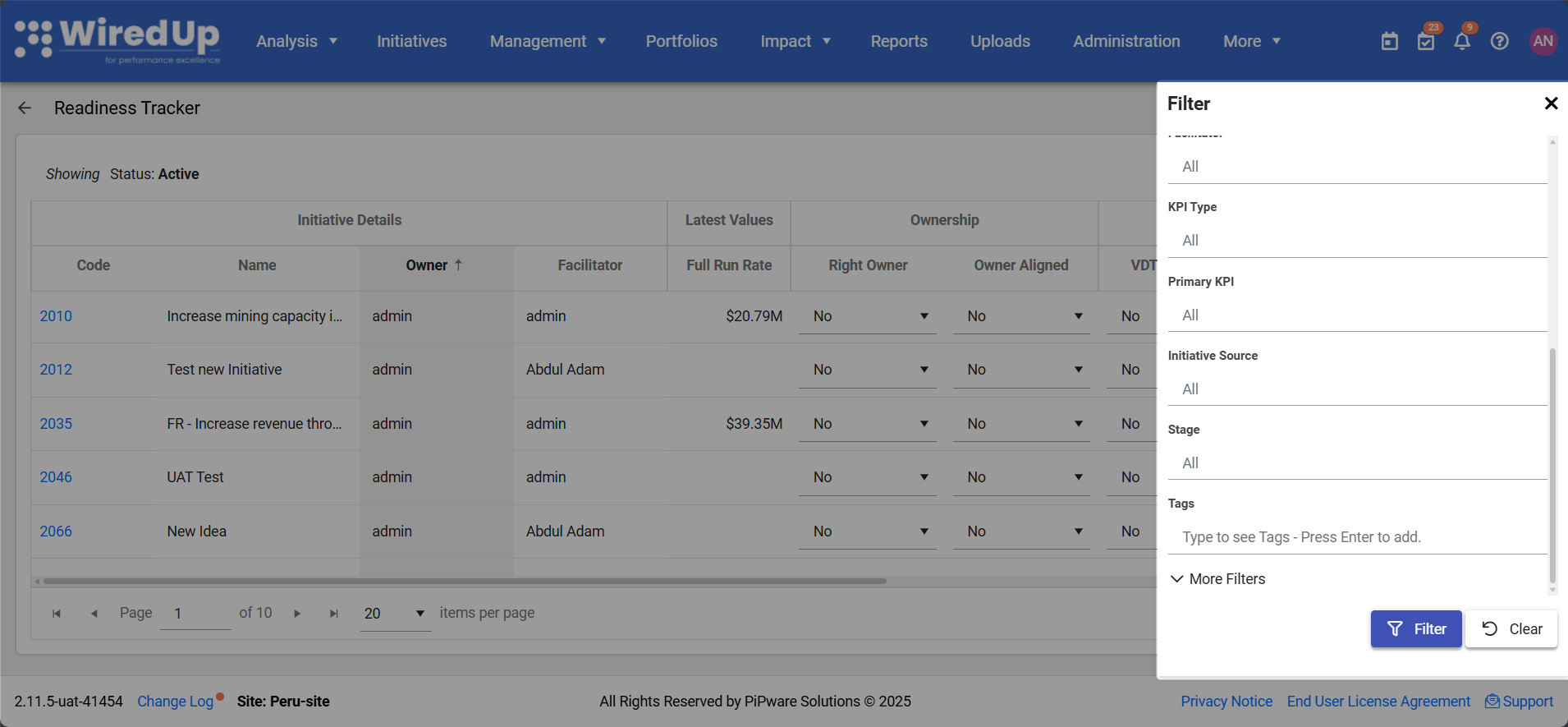
Facilitator
- Filter ideas/initiatives by the assigned facilitator
- Default setting shows "All" facilitators
- Helps track ideas/initiatives facilitated by specific individuals
KPI Type
- Filter ideas/initiatives based on their associated KPI type
- Default setting shows "All" KPI types
- Helps narrow down ideas/initiatives linked to specific performance indicators
Primary KPI
- Filter by the primary KPI associated with the idea/initiative
- Default setting shows "All" primary KPIs
- Useful for focusing on ideas/initiatives linked to specific key performance indicators
Initiative Source
- Filter by the source or origin of the idea/initiative
- Default setting shows "All" sources
- Helps track ideas/initiatives from specific channels or origins
Stage
- Filter by specific pipeline stages (e.g., Evaluating, Implementing, Cash Flowing, Locked In)
- Default setting shows "All" stages
- Useful for focusing on ideas/initiatives at particular points in the pipeline
Tags
- Filter ideas/initiatives by associated tags
- Type to search for tags and press Enter to add
- Useful for analyzing ideas/initiatives with specific classifications or categories
More Filters
- Additional filtering options based on custom filterable idea fields configured in your system's Administration settings under Administration > Ideas/Initiative Fields
- These filters are dynamically generated based on your organization's specific idea field configurations
- Click the + icon to add more filters
Downloading the Report
The Readiness Tracker Report can be exported for offline viewing, sharing, or further analysis:
- Click the Download button in the top-right corner of the report
- The report will be exported in Excel format

- The downloaded file will include all currently applied filters and all visible ideas/initiatives data with their readiness assessments
The Excel export allows you to:
- Perform additional analysis on readiness data
- Share the report with stakeholders who may not have system access
- Track readiness improvements over time by saving periodic exports
- Create custom reports or presentations using the exported data
- Conduct readiness assessments offline
- Maintain historical records of idea/initiative readiness
Best Practices
- Review the report regularly to monitor idea/initiative readiness and identify gaps requiring attention
- Update readiness attributes as ideas/initiatives progress to maintain accurate tracking
- Focus on "No" responses to identify areas requiring improvement or completion
- Use the report before initiatives progress to next stages to ensure ideas/initiatives meet readiness criteria before progression
- Filter by Stage to assess readiness for ideas/initiatives at specific pipeline stages
- Monitor Ownership attributes to ensure proper accountability and alignment
- Review Robustness attributes to verify ideas/initiatives have complete and accurate data
- Check Value Delivery attributes to confirm ideas/initiatives are ready for implementation
- Download and archive reports periodically to track readiness improvements over time
- Use Portfolio filters to analyze readiness across different organizational areas
- Use the report in governance meetings to discuss idea/initiative readiness and gate progression
Related Articles
Based on the knowledge base, you may also find these related articles helpful:
- Ideas/Initiative Progress Report
- All Ideas Report
- Ideas Pipeline By Department Report
- Idea/Initiative Approvals